Shopify Bundles App vs Bundlify: Which Product Bundle App Is Best for Your Store in 2026?

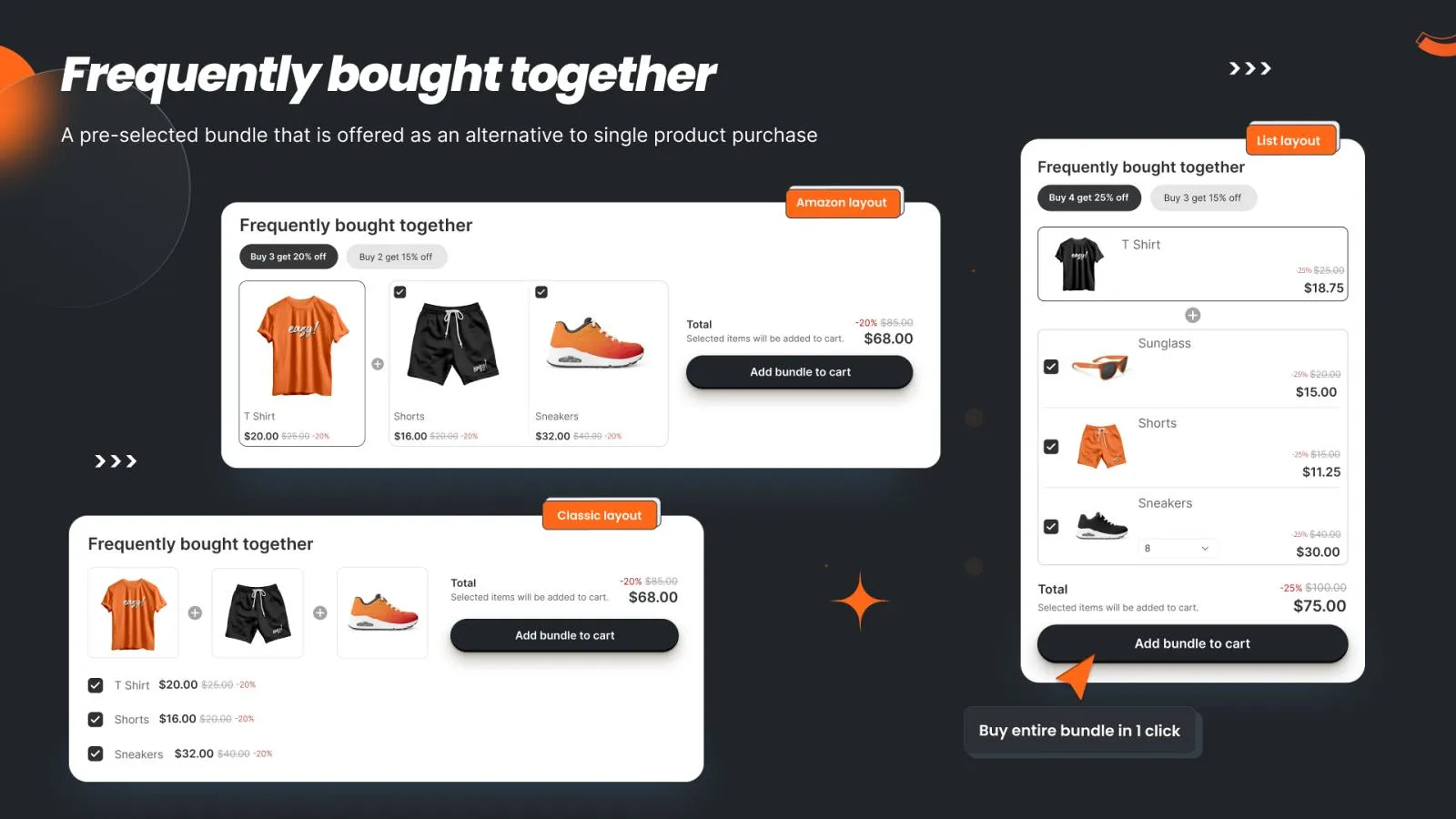
👉 Try the bundle app this guide compares: Install Bundlify ‑ Bought together on the Shopify App Store →
Product bundling increases average order value (AOV) by 20–35% across ecommerce stores (Shopify Blog). But Shopify merchants now face a real decision: use Shopify's free native Bundles app, or install a third-party solution like Bundlify – Bought Together?
This guide breaks down the differences with real feature comparisons, use cases, and data so you can pick the right tool for your store.
Why Product Bundling Matters More Than Ever
The numbers tell the story:
- Amazon's "Frequently Bought Together" section drives an estimated 35% of its total revenue (McKinsey).
- Personalized product recommendations increase conversions by 26% (McKinsey).
- Bundle pricing increases customer spending per transaction, resulting in higher AOV and more profitable customer relationships (Shopify Blog).
- The Shopify App Store has 328+ product bundle apps — proof that merchants want bundling solutions.
Yet most Shopify stores still don't bundle their products. If you're one of them, you're leaving money on the table.
The Two Options: A Quick Overview
| Shopify Bundles (Native) | Bundlify – Bought Together | |
|---|---|---|
| Price | Free | $1.99/month (30-day free trial) |
| Bundle Types | Fixed bundles, multipack | FBT, custom, collection-based, fixed, mix-and-match |
| AI Recommendations | ❌ | ✅ Smart fallback recommendations |
| Post-Purchase Upsell | ❌ | ✅ One-click post-purchase offers |
| Checkout Extension | ❌ | ✅ Checkout recommendation widget |
| Discount Types | Fixed price only | Percentage, fixed amount, dynamic |
| Order Limits | ❌ | ✅ Min/max per product + checkout validation |
| Widget Customization | Basic | Full (colors, fonts, layout, grid/list) |
| Analytics | Basic Shopify analytics | Built-in bundle performance tracking |
| Collection-Based Rules | ❌ | ✅ Auto-recommend from same collection |
Deep Dive: Shopify Bundles (Native App)
Shopify Bundles is Shopify's own free bundling solution, launched to give merchants basic product bundling without needing a third-party app.
What It Does Well
- It's free — no monthly cost, no transaction fees
- Native integration — bundles are created as actual Shopify products with synced inventory
- Simple setup — create fixed bundles and multipacks directly in your admin
- Inventory sync — component inventory updates automatically
Where It Falls Short
- No "Frequently Bought Together" widget — you can't show FBT suggestions on product pages
- No AI or smart recommendations — bundles must be manually created one by one
- No post-purchase offers — you miss the highest-converting upsell moment
- No checkout upsell extension — nothing happens between cart and thank-you page
- Limited discount flexibility — only fixed bundle pricing, no percentage discounts
- No order limits — can't enforce min/max quantities at checkout
- No collection-based automation — every bundle is manually configured
For stores selling fewer than 20 products with simple bundling needs, Shopify's native app might be enough. But the moment you want to cross-sell intelligently or upsell at checkout, you need more.
Deep Dive: Bundlify – Bought Together
Bundlify – Bought Together takes a multi-surface approach to product bundling. Instead of just creating static bundles, it puts recommendations and upsell offers at every stage of the customer journey.
1. Frequently Bought Together (Product Page)
The classic Amazon-style FBT widget appears on your product pages. You can:
- Set custom product recommendations per product
- Use collection-based rules to auto-recommend products from the same collection
- Enable AI/smart fallback to automatically suggest products when you haven't set manual rules
- Choose between grid, list, or legacy widget layouts
- Control how many recommendations to show
2. Checkout Recommendations (Shopify Plus)
A checkout extension that shows bundle suggestions during checkout — the highest-intent moment in the buying process. Customers can add recommended products without leaving the checkout flow.
3. Post-Purchase Offers
After a customer completes payment but before the thank-you page, Bundlify shows a one-click upsell offer. This is the highest-converting upsell surface because:
- The customer has already entered payment details
- There's zero friction to add another item
- It doesn't interrupt the original purchase decision
4. Shopify Native Bundles
Bundlify also supports creating Shopify native product bundles using the ProductBundle API — giving you inventory-synced bundles just like the native app, plus all the extra features.
5. Order Limits & Checkout Validation
Set min/max order quantities per product or variant, with:
- Storefront messaging that shows the limit to customers
- Checkout validation that blocks purchases exceeding limits
- Full UI customization (colors, fonts, padding, borders)
6. Full Widget Customization
Customize every aspect of the recommendation widget:
- Title text, font family, font size, alignment
- Image width and border radius
- Button colors, hover states, border radius
- Price labels, "This item" labels, Add-to-Cart text
- Product name and price colors
5 Scenarios: Which App Wins?
Scenario 1: "I sell skincare and want to bundle a cleanser + toner + moisturizer"
Winner: Either — both apps can create a fixed bundle product. Shopify Bundles is free and handles this well.
Scenario 2: "I want to show 'Customers also bought' suggestions on every product page"
Winner: Bundlify — Shopify Bundles has no FBT widget. Bundlify shows AI-powered or custom recommendations on every product page automatically.
Scenario 3: "I want to upsell customers AFTER they've already paid"
Winner: Bundlify — post-purchase offers are exclusive to Bundlify. This is where the highest conversion rates happen because customers have already committed to buying.
Scenario 4: "I have 500+ products and can't manually bundle each one"
Winner: Bundlify — collection-based rules and AI fallback mean Bundlify can auto-generate recommendations across your entire catalog. Shopify Bundles requires creating each bundle manually.
Scenario 5: "I need to limit bulk orders to prevent reseller abuse"
Winner: Bundlify — the order limits feature with checkout validation blocks purchases that exceed your rules. Shopify Bundles has no order limit functionality.
Cost Analysis: Is $1.99/Month Worth It?
Let's do the math:
- Average Shopify store AOV: $85 (Littledata)
- Bundling increases AOV by 20–35% → that's $17–$30 extra per order
- If you get just 1 extra bundle sale per month, that's $17–$30 in additional revenue
- Bundlify costs $1.99/month → ROI: 854% to 1,407% on the first extra sale alone
And with post-purchase offers (which have conversion rates of 3–8%), the math gets even better. If your store processes 500 orders/month:
- 500 × 5% post-purchase conversion = 25 extra sales/month
- 25 × $20 average upsell = $500 additional monthly revenue
- $500 − $1.99 = $498.01 net gain
When to Use Shopify Bundles (Native)
Choose Shopify's native Bundles app if:
- ✅ You sell fewer than 20 products
- ✅ You only need fixed bundles or multipacks
- ✅ You don't want any monthly app costs
- ✅ You don't need product page recommendations
- ✅ You don't need post-purchase or checkout upsells
When to Use Bundlify – Bought Together
Choose Bundlify if:
- ✅ You want Amazon-style "Frequently Bought Together" on product pages
- ✅ You want AI-powered recommendations across your catalog
- ✅ You want post-purchase one-click upsells
- ✅ You need checkout-level upsells (Shopify Plus)
- ✅ You want to set order limits with checkout validation
- ✅ You have a large catalog and need collection-based automation
- ✅ You want full widget design control to match your brand
FAQ: Shopify Bundles vs Bundlify
Can I use both Shopify Bundles and Bundlify together?
Yes! Some merchants use Shopify Bundles for simple fixed bundles and Bundlify for FBT recommendations, post-purchase offers, and checkout upsells. They serve different purposes and don't conflict.
Does Bundlify slow down my store?
No. Bundlify loads its storefront widget asynchronously through a Shopify theme app extension block. It only loads on product pages where recommendations exist.
Does Bundlify work with my theme?
Yes. Bundlify uses Shopify's Online Store 2.0 theme app extension system, which is compatible with all modern Shopify themes. The widget is fully customizable to match your store's design.
What discount types does Bundlify support?
Bundlify supports percentage discounts and fixed amount discounts at both the recommendation level and global level. You can also set minimum bundle subtotal thresholds before discounts apply.
Is there a free trial?
Yes. Bundlify offers a 30-day free trial so you can test all features — including FBT recommendations, post-purchase offers, and checkout extensions — before paying $1.99/month.
The Bottom Line
Shopify Bundles is a solid free option for basic bundling. But if you want to maximize revenue at every touchpoint — product pages, checkout, and post-purchase — Bundlify gives you the full toolkit for less than the cost of a coffee.
The stores that grow fastest in 2026 aren't just selling products. They're selling combinations — and using every surface available to do it.
Ready to start bundling smarter?
Try Bundlify Free for 30 Days →