AC – Questions & Answers: The Complete Guide to Turning Customer Questions Into Confident Purchases

👉 Give shoppers a place to ask, right where they're deciding: Install AC ‑ Questions & Answers on the Shopify App Store →
The average Shopify store converts about 1.58% of its visitors (IRP Commerce, 2025). Put differently: 98 out of every 100 people who land on your product page leave without buying. Price is part of that story, but a Forrester finding puts a sharper point on it — 53% of US online shoppers say they'll abandon a purchase if they can't quickly find the answer to a question. Not a bad answer. No answer.
That's the exact gap AC – Questions & Answers by AppifyCommerce is built to close: a Q&A section that lives directly on your product pages, so the question that's stalling a sale gets answered right there, in public, before the shopper clicks away.
Why Product Questions Decide Purchases
Shoppers don't abandon carts at random. Salesforce's State of Service research found that 61% of customers prefer to solve a simple question themselves rather than open a chat or send an email — they want the answer sitting on the page, not locked behind a support ticket. And when they do find one, it changes behavior: a Bazaarvoice analysis found shoppers who interact with on-page Q&A are 157% more likely to convert than shoppers who don't.
That's the mechanism behind AC – Questions & Answers' own tagline — turn customer questions into confident purchases — and it's worth being precise about why it works. A product page is a monologue: you describe the item, and the shopper either believes they understand it well enough to buy, or they don't. A Q&A section turns that monologue into a conversation, built from the actual doubts real shoppers had, answered where the next hundred visitors with the same doubt can see it.
Feature 1: Let Customers Ask Questions Directly on Product Pages
This is the foundational feature, and it's easy to undersell because it sounds simple. The difference between a Q&A block and a "contact us" link is the difference between a doubt getting resolved in the next thirty seconds versus a doubt that gets emailed, queued, and answered — if it's answered at all — a day later.
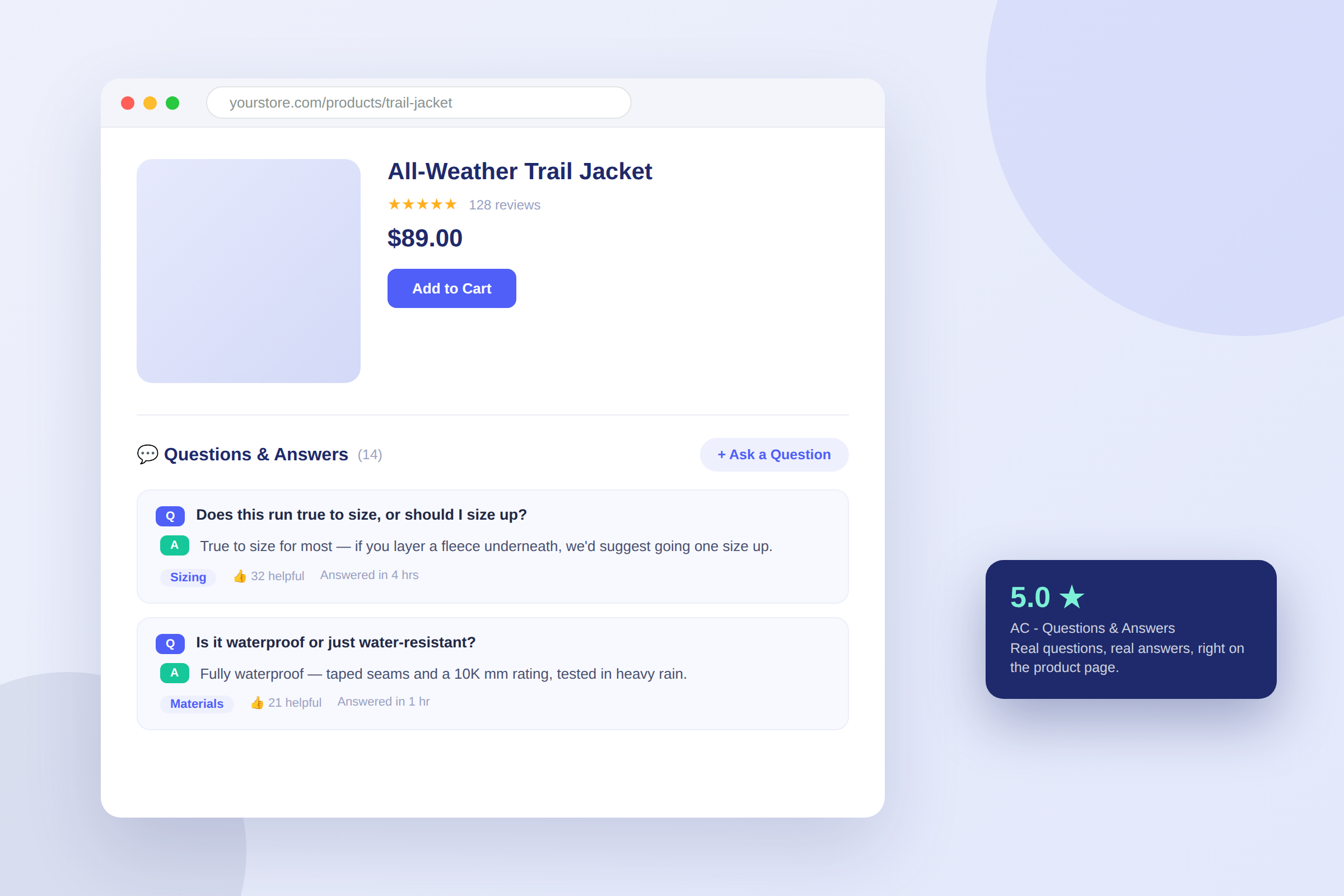
With AC – Questions & Answers, a shopper looking at your product sees an "Ask a Question" control right below the price and buy button, where their attention already is. They type the question, optionally attach up to three images (useful for anything where "does this match/fit/fit-with" is the doubt), and submit. No account creation, no navigating away from the product.
Every question that gets answered stays attached to that product permanently. The next shopper with the identical doubt — and product doubts cluster far more than merchants expect — doesn't have to ask again. They just read the answer that's already there. Over months, a popular product accumulates a genuine, specific knowledge base that a generic FAQ page, written from guesses, never quite replicates.
Feature 2: AI-Powered Answers for Faster, Smarter Responses
The honest tension in any Q&A system is speed versus trust: answer instantly and you risk publishing something wrong; wait for a human and the shopper may already be gone. AC – Questions & Answers' AI answers (available on the Professional plan) are built to close that gap without giving up the review step.
When a question comes in, the AI reads your product data and drafts a response — with a choice of tone (Expert, Professional, Playful, or Human) and multiple variants to choose from, so the answer sounds like your brand rather than a generic chatbot. What it does not do is publish itself. The draft lands in your moderation queue, you pick the best variant or edit it, and only then does it go live. That one extra click is the difference between "fast" and "fast and right."
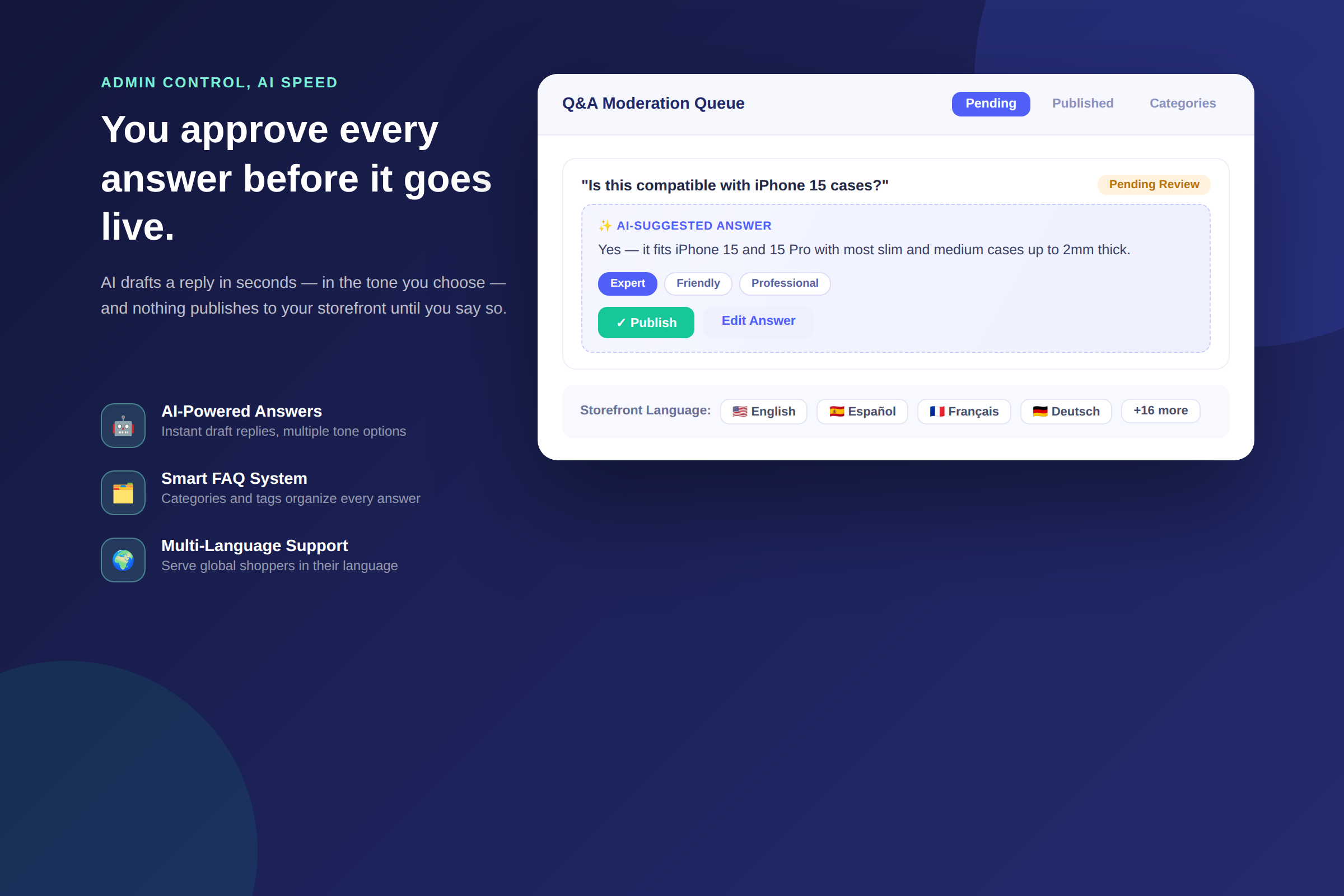
The practical effect: response time on the questions you'd otherwise sit on overnight drops from hours to minutes, without handing your product page's accuracy over to a language model with no one checking its work.
Feature 3: Admin Control to Review, Manage and Publish
Every question submitted through the widget lands in an admin queue first — nothing appears on your storefront until you've seen it. From there you can approve it as-is, edit the wording, merge it with a near-duplicate, or decline it outright if it's spam or off-topic (reCAPTCHA protection and a report-inappropriate-content flow handle most of that automatically).
This matters more than it sounds like it should. An unanswered question sitting publicly on a product page is arguably worse than no Q&A section at all — it visibly signals nobody's watching. Moderation is what keeps a Q&A section working for you instead of against you: it's the checkpoint that guarantees every published answer is one you'd stand behind, whether a human wrote it from scratch or approved an AI draft.
Feature 4: A Smart FAQ System With Categories and Tagging
Left unorganized, a product with fifty questions becomes hard to scan — which defeats the purpose. AC – Questions & Answers lets you assign categories and tags (Sizing, Materials, Shipping, Compatibility, or whatever divisions make sense for your catalog), so shoppers can filter straight to the kind of doubt they actually have instead of scrolling past thirty unrelated questions to find one relevant answer.
This is also where a Q&A section quietly turns into an SEO asset. Every published question and answer is unique, keyword-rich text that a static product description never generates on its own — written in the shopper's own words, about the exact thing they were unsure of. Tagged and categorized, it becomes a genuinely searchable knowledge base attached to the product, not a wall of undifferentiated text.
Feature 5: Multi-Language Support With Easy Customization
If you sell internationally, a Q&A section only helps the shoppers who can read it. AC – Questions & Answers supports translated storefront display, so a shopper browsing in Spanish, French, German, or any of the languages you enable sees the widget — labels, prompts, and published answers — in their own language, without a separate app or a manually maintained translation file.
Customization runs alongside the language support: three widget layouts (Regular, Accordion, Modern), full show/hide control over individual elements, and custom CSS for stores that want pixel-level control over how the section sits inside their theme. The goal is the same throughout — the Q&A section should read as a native part of your store, not a bolted-on third-party widget.
Putting the Five Features Together
None of these features does much alone. The value compounds when they work as a loop: a shopper asks a question in their own language → AI drafts a fast answer → an admin reviews and publishes it in a click → it's filed under the right category → the next shopper with the same doubt, in any supported language, finds it already answered. Each cycle through that loop makes the next one a little less necessary, because the product page keeps getting better at answering the question before it's even asked.
What Merchants Are Saying
"This app is fantastic. Customers definitely use it, and I have gotten orders that might have otherwise been lost. The customer service is amazing too." — Simpli Stamped, United States (5★)
"A great, user friendly app. It allows both product and tag based questions and works well. Support is very quick to help and resolve any challenges." — Audio Trends, Australia (5★)
"The app's design is simple and easy to view, and it is also very easy to use. It can be used as an FAQ, and separately, it allows customers to submit their own Q&A as well. Highly recommended!" — くらしラボ, Japan (5★)
AC – Questions & Answers currently holds a 5.0-star rating on the Shopify App Store (verified on the app listing).
Pricing
| Plan | Price | What's Included |
|---|---|---|
| Free | $0/month | 25 Q&A per month, direct publish, email notifications |
| Basic | $1.99/month | Unlimited Q&A, moderation controls, CSV import |
| Advanced | $3.99/month | Mailchimp integration, custom email templates, multi-language |
| Professional | $9.99/month | AI-powered answers, unlimited import/export, priority support |
Pricing verified on the Shopify App Store listing — check the listing before you buy, as plans can change.
Getting Started
- Install AC – Questions & Answers from the Shopify App Store.
- Enable the app embed under Online Store → Themes → Customize → App Embeds.
- Add the Q&A block to your product page template in the theme editor.
- Set your categories and notification emails, and decide whether new questions publish automatically or wait for your review.
- Optional: upgrade to Professional to turn on AI-drafted answers.
No developer required — it works on Shopify's Online Store 2.0 themes out of the box.
FAQ
Does the AI publish answers automatically?
No. AI-generated answers are drafts. They land in your admin queue for review, and you choose to publish, edit, or discard each one — the AI adds speed, not autopilot.
Will unanswered questions hurt my store if I can't reply fast?
They can, if they sit publicly for too long. Set moderation so questions only publish once answered, and treat the queue as a daily habit rather than an afterthought — a Q&A section only builds trust when it's actively maintained.
Can I pre-load my product pages with common questions?
Yes. Questions and answers can be imported via CSV or added manually through the admin, so you can seed a product's Q&A section with the questions you already know shoppers ask, before your first real one arrives.
Does this replace a FAQ page?
Not quite — the two serve different jobs. A FAQ page answers questions you predicted for the whole store; product Q&A answers questions shoppers actually asked about a specific product. AC – Questions & Answers focuses on the latter, which is where purchase-stage doubt actually lives.
Is there a free plan?
Yes. The free plan includes 25 published Q&A per month, direct publishing, and email notifications — enough to see whether product Q&A changes your conversion rate before committing to a paid tier.
The Bottom Line
A product page's job is to get someone from "interested" to "confident enough to buy." Photos and descriptions carry that most of the way. The last few feet — the specific doubt that's unique to this shopper, this product, this moment — is what a Q&A section is for. AC – Questions & Answers puts that conversation directly on the page, speeds it up with AI without giving up review, organizes it so it keeps paying off, and makes it legible to shoppers anywhere in the world.
Ready to answer the question that's costing you the sale?
Install AC – Questions & Answers Free →