How to Create Professional PDF Product Catalogs in Shopify with Catlogify


👉 Fix your store's Catlogify App now: Install Catlogify on the Shopify App Store →
How to Create Professional PDF Product Catalogs in Shopify with Catlogify
Running a Shopify store means your products already live online—but what happens when you need to share those products outside your storefront?
A wholesale buyer may ask for a product line sheet. A sales representative may need a catalog to present to customers. You might want a downloadable PDF for a trade show, retail meeting, distributor or offline sales opportunity.
Creating these catalogs manually can quickly become repetitive. You have to collect product images, copy descriptions, organize product information, create layouts, export PDFs and then repeat the process whenever your products change.
Catlogify by Appify Commerce provides Shopify merchants with a simpler way to turn their existing store products into professional PDF catalogs and wholesale line sheets.
What Is Catlogify?
Catlogify is a Shopify app designed to help merchants create PDF product catalogs and line sheets directly from their store's product information.
Instead of rebuilding your product information in another design tool, you can use the products and collections already available in Shopify to create downloadable catalogs.
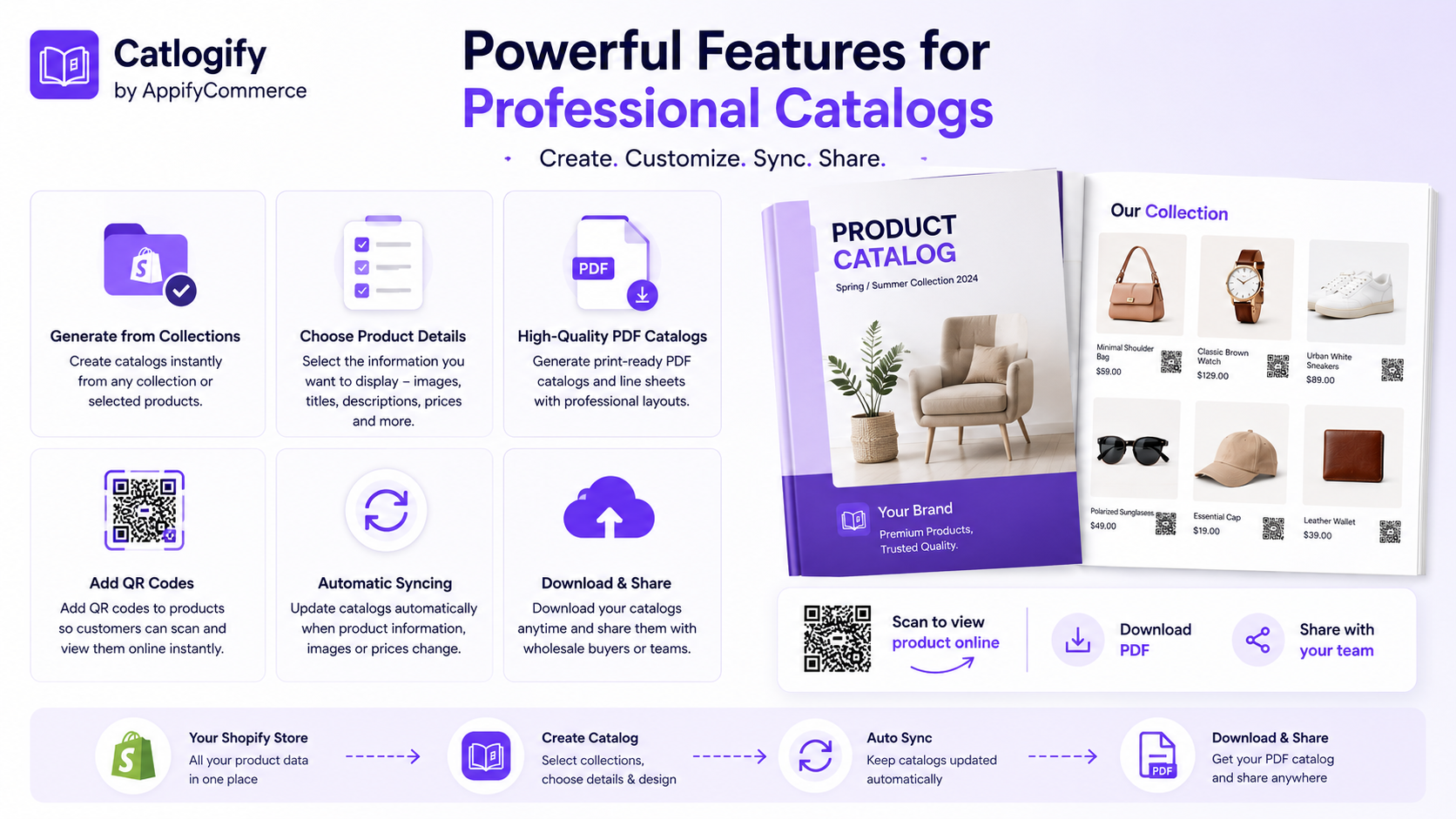
With Catlogify, merchants can:
- Generate PDF catalogs using Shopify products
- Build catalogs from collections
- Select which products appear
- Choose which product information to display
- Include product images, titles and descriptions
- Add product QR codes
- Generate wholesale line sheets
- Download catalogs as PDFs
- Update catalogs when store product information changes
This makes Catlogify useful for both online and offline product presentation workflows.
Why Do Shopify Stores Still Need PDF Catalogs?
Your Shopify storefront is an important sales channel, but not every buying journey starts on your website.
Consider a wholesale buyer reviewing hundreds of products from several suppliers. Opening individual product pages isn't always the easiest way to compare them.
A well-organized PDF catalog puts the information in one convenient document.
PDF catalogs can be useful for:
Wholesale sales: Send buyers a product line sheet containing the products relevant to them.
B2B presentations: Give distributors, retailers and sales representatives an easy way to review your range.
Trade shows: Provide digital or printed product catalogs while meeting potential buyers.
Sales teams: Give representatives a portable product resource they can use during presentations.
Customer sharing: Make it easier to share a curated selection of products outside your Shopify storefront.
The result is a bridge between your Shopify product data and the conversations happening beyond your online store.
Turn Shopify Products Into PDF Catalogs
One of Catlogify's biggest advantages is simplicity.
Your Shopify store already contains much of the information needed to create a catalog.
Instead of manually copying that information into another document, Catlogify uses your store product data to build the catalog.
The basic workflow is simple:
Shopify Products → Select Products → Choose Template → Generate Catalog → Download PDF
You can create a catalog in a few steps:
- Open Catlogify in your Shopify admin.
- Click New Catalog.
- Select the products you want to include.
- Choose your catalog template.
- Generate your catalog.
- Download the PDF.
You can then use that PDF for your wholesale, sales or product presentation workflow.
Create Catalogs for Different Audiences
Not every customer needs to see your entire product range.
A wholesale buyer may only be interested in one collection. A seasonal campaign may require only your newest products. A sales representative might need a catalog for a particular product category.
Catlogify lets you choose which products are included in a catalog.
That means you can create focused catalogs such as:
- New Arrivals
- Summer Collection
- Best Sellers
- Wholesale Products
- Featured Products
- Seasonal Collection
- Product Category Catalogs
- Buyer-Specific Selections
Instead of sending everyone the same large catalog, you can create more relevant product presentations.
Control the Product Information You Display
A useful catalog isn't simply a collection of product images.
The information presented alongside those products matters.
Catlogify gives merchants control over which product details appear in their catalogs, allowing the document to better fit its intended purpose.
For example, your catalog can include information such as product images, titles and descriptions.
A visual product presentation may prioritize large images, while a wholesale line sheet may need a more information-focused layout.
This flexibility helps merchants create catalogs that serve different sales scenarios without maintaining product information in completely separate systems.
Connect Printed Catalogs to Your Shopify Store with QR Codes
Printed catalogs have one obvious limitation: they're offline.
Catlogify helps connect the physical and digital shopping experiences through product QR codes.
A QR code can be included with a product in your catalog. A customer or buyer can scan it with a mobile device and quickly access the corresponding online product page.
Imagine handing a buyer a printed catalog at a trade show.
They find a product they're interested in.
Instead of searching for your website and then searching for that particular product, they simply scan the QR code.
See Product → Scan QR Code → Open Product Page
This creates a convenient connection between your catalog and your Shopify storefront.
Create Wholesale Line Sheets More Efficiently
For merchants selling B2B, wholesale line sheets can be an important part of the sales process.
A traditional line sheet often requires merchants to manually collect product information, place it into a spreadsheet or design template, export the document and update it again whenever something changes.
Catlogify brings this workflow closer to your Shopify product data.
You can select the products needed for your wholesale presentation and generate a downloadable document without rebuilding the catalog from scratch in a separate design application.
That can make catalog creation easier for growing brands that regularly communicate with retailers, distributors and wholesale buyers.
What Happens When Your Shopify Products Change?
One of the biggest frustrations with manually created catalogs is keeping them current.
Suppose you update a product description or other product information in Shopify.
With a completely separate PDF workflow, someone on your team may also need to remember to edit the catalog.
Catlogify allows merchants to update and regenerate their catalogs when product information changes.
This reduces the need to recreate an entire catalog manually whenever your store data is updated.
Catlogify vs. Creating Catalogs Manually
Consider the difference between the two workflows.
Manual Catalog Workflow
Shopify → Copy Product Data → Download Images → Open Design Tool → Build Pages → Add Links/QR Codes → Export PDF → Repeat When Products Change
Catlogify Workflow
Shopify → Select Products → Choose Catalog Setup → Generate → Download
For stores with a growing number of products, simplifying these repetitive steps can save valuable operational time.
Who Is Catlogify For?
Catlogify can be particularly useful for:
Shopify wholesalers who regularly send product selections to buyers.
B2B brands that need professional product presentations.
Manufacturers and distributors managing multiple products or collections.
Fashion and apparel stores that create seasonal or collection-based catalogs.
Home and lifestyle brands with highly visual product ranges.
Sales teams that need downloadable product information.
Trade show exhibitors that want printable catalogs connected to online products through QR codes.
Growing Shopify merchants who want a simpler alternative to manually designing every product catalog.
Catlogify Pricing
Catlogify currently offers three pricing options.
Free
Create up to 1 catalog Up to 25 products
Pro – $3.99/month
Create up to 5 catalogs Up to 250 products Product QR codes Digital Catalog 7-day free trial
Business – $19.90/month
Unlimited catalogs Unlimited products Product QR codes Digital Catalog 7-day free trial
Annual billing options are also available.
This gives smaller stores an opportunity to start with a basic catalog and move to higher limits as their catalog requirements grow.
Why Use Catlogify?
The core benefit of Catlogify is straightforward:
Your product information already exists in Shopify. Your catalog shouldn't have to be built from scratch somewhere else.
Catlogify turns existing store product data into reusable catalogs that can support wholesale, B2B and product presentation workflows.
You get a simpler way to:
✓ Create professional PDF product catalogs ✓ Generate wholesale line sheets ✓ Select products from your store ✓ Control displayed product information ✓ Add QR codes for online product access ✓ Create downloadable PDFs ✓ Update catalogs as your products change
Instead of spending time manually moving product information between Shopify and catalog documents, you can keep the workflow connected to your store.
How to Get Started
Getting started with Catlogify takes only a few steps.
Install Catlogify from the Shopify App Store, create a new catalog, choose the products you want to showcase, select your catalog setup and generate your PDF.
You can then download and share your catalog with customers, wholesale buyers, distributors or your sales team.
Whether you're preparing for a wholesale meeting, creating a seasonal product guide or simply looking for an easier way to turn Shopify products into a PDF, Catlogify gives you a streamlined way to do it.
Create Your First Shopify PDF Catalog
Your Shopify products are already organized.
Now turn them into a catalog that's ready to share.
Create professional PDF catalogs and wholesale line sheets with Catlogify by Appify Commerce.
👉 Fix your store's Catlogify App now: Install Catlogify on the Shopify App Store →