Your Customers' Questions Are Free Product Research: A 30-Day Playbook for AC – Questions & Answers

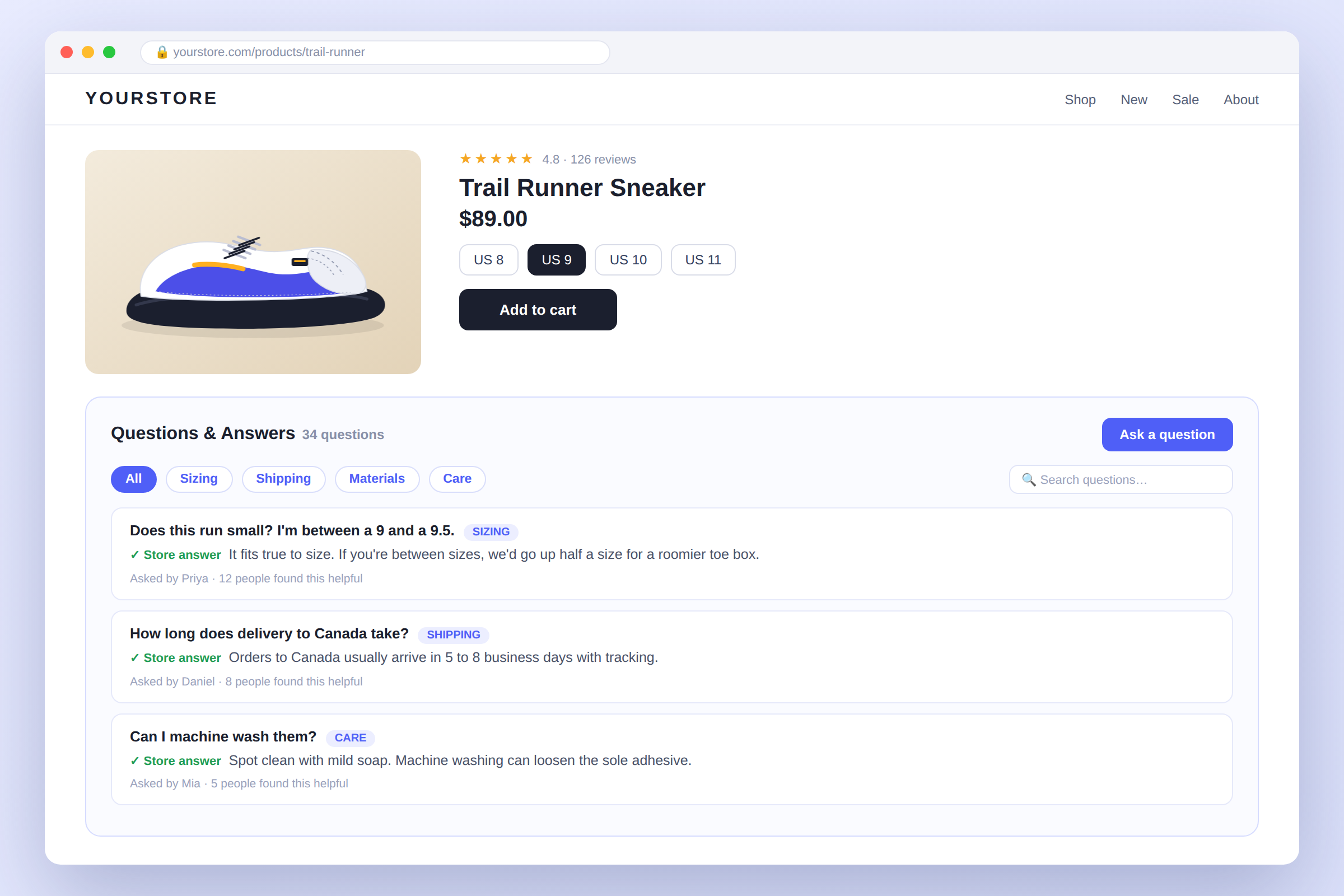
👉 Give shoppers a place to ask, right where they're deciding: Install AC ‑ Questions & Answers on the Shopify App Store →
Most merchants install a Q&A app to answer shoppers. That's the obvious job, and it's a good one. The less obvious job is the one that tends to pay back longer: every question a shopper types is a free, unprompted note about what your product page failed to say.
This post is a working playbook, not a feature tour. If you want the feature-by-feature version, we already wrote the complete guide. This one is about what to do in your first 30 days with AC ‑ Questions & Answers, so the section earns its place on the page.
Why a Q&A Section Needs a Plan
Add a Q&A block to a product page and do nothing else and one of two things happens. Either nobody asks anything, so the section sits empty and looks abandoned or questions arrive and sit unanswered, which looks worse. Neither is a software problem. It's a routine problem.
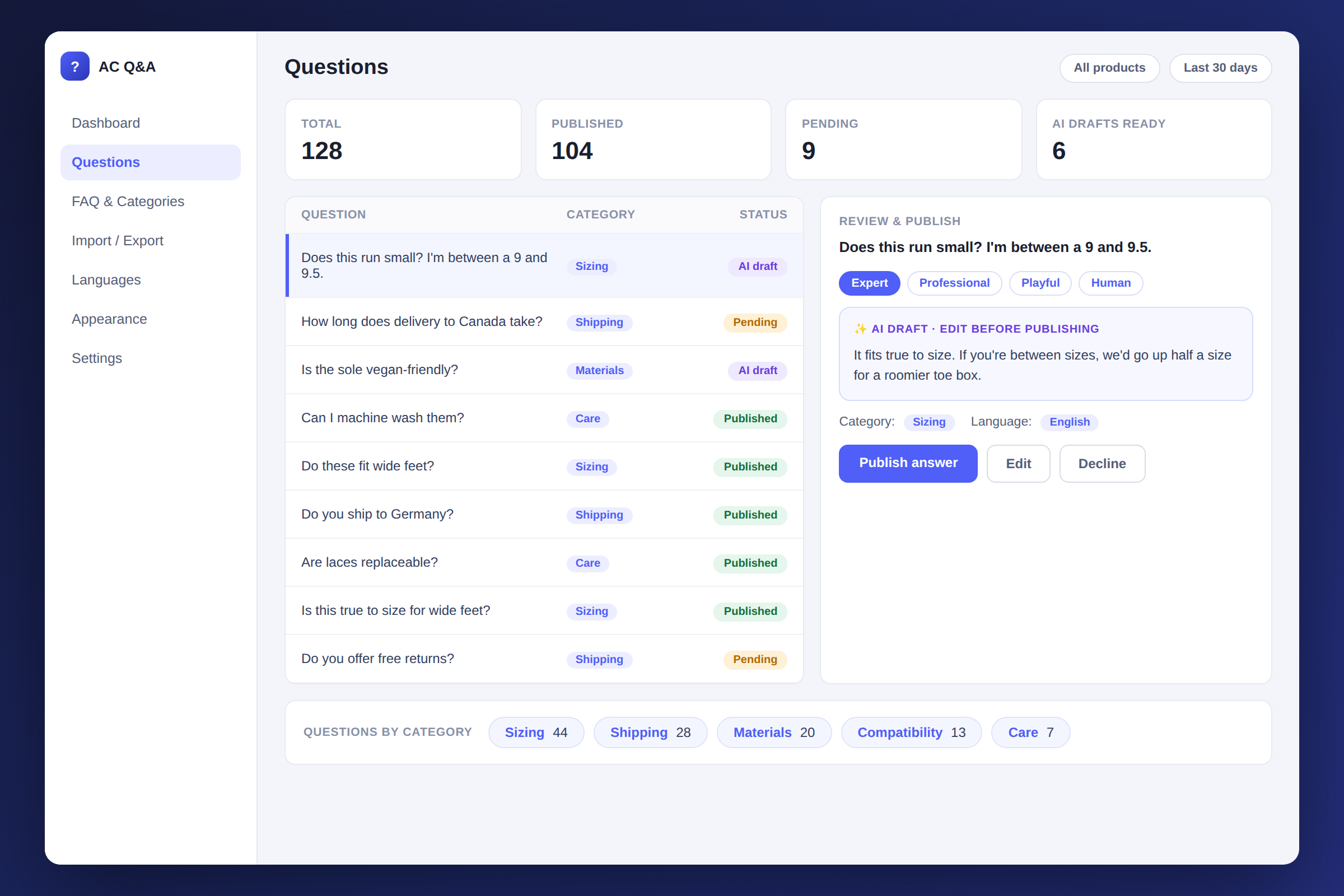
The app is built so the routine is short: shoppers ask directly on the product page, you review and publish from an admin queue and AI can draft answers if you're on the Professional plan. The playbook below turns that into four weeks of small, repeatable steps.
Week 1: Seed the Section
An empty Q&A tab gives a first-time visitor no reason to ask the first question. So don't start empty.
Gather the questions you already get somewhere else: support emails, Instagram DMs, order-note messages, the things your team keeps typing the same answer to. Write them up as question-and-answer pairs and import them. Basic includes an import limit of 200 and Advanced raises it to 2,000, so even a store with a long support history can load its best material in one go.
Start with your five best-selling products. A few real, specific answers on each tell new shoppers that someone is home and that asking is normal.
Week 2: Set the Review Flow
Decide, before real traffic arrives, what publishes on its own and what waits for you. Every question can land in the admin queue first, where you approve it, edit the wording, or decline it. Free publishes directly and Basic adds pre-publication verification, which is the setting most stores want once questions start coming in regularly.
Then make one commitment: check the queue once a day. An unanswered public question sends the opposite message from the one you want. A habit of answering within a day is worth more than any setting.
If you're on Professional, this is the week to turn on AI-powered answers. The AI drafts a reply from your product information, and it goes through the same queue. You read it, fix anything that's off, and publish. It saves typing, not judgement. Under a few dozen questions a month, you may find writing the answers yourself is just as quick and reads more like you.
Week 3: Categorize and Tag
By now you have a few dozen questions. This is where the app's FAQ system with categories and tagging stops being a nicety and starts being useful.
File each answer under a category that matches how shoppers think: Sizing, Shipping, Materials, Compatibility, Care. Tags let you cut across categories for the cases that don't fit one box. For shoppers, this means a visitor with a sizing doubt can go straight to sizing answers instead of scrolling past thirty others.
For you, it does something quieter. Once questions are labelled, you can see which doubt appears most. That count is the most honest feedback you'll get on your product copy and you get it without running a survey.
Week 4: Fix the Page, Not Just the Answer
Here's the step most stores skip. If "Does this run small?" is your most common question, answering it forty times is the slow way to fix it. The fast way is to put the answer where shoppers look first: a size chart, a "fits true to size" line, a photo on a model with their height listed.
Take your top two or three recurring questions and move the answer into the description, the photos or the variant labels. Keep the Q&A thread too, since shoppers who skim the page still benefit from it, but you've now removed the doubt at its source. Over the following weeks, watch whether that category's count falls. If it does, the page got clearer. If it doesn't, the answer probably isn't where people are looking.
Selling in More Than One Language
If you sell to shoppers who don't read your store's main language, the Q&A section is one of the first places they'll look for reassurance. AC ‑ Questions & Answers supports multiple languages with easy customization, so the labels and prompts can match the language your visitor is browsing in. Multi-language sits on the Advanced plan and above, so factor that in if international shoppers are a real share of your traffic.
Keeping It Organized as It Grows
A few settings are worth knowing about once the section is busy. You can show questions in accordion or tab layouts, so a product with many answers stays scannable. A rich text editor and video support mean an answer can be more than a sentence when a short clip explains something better. Notifications can go through Klaviyo, Mailchimp, Mailgun or SendGrid, so the people who asked hear back where they're already reading.
The app also includes SEO optimization and it's mobile responsive, which matters because many product-page visits start on a phone.
What Merchants Are Saying
The app holds a 5.0-star rating on the Shopify App Store across 29 reviews, and 97% of them are five-star. One merchant, Wisher Performance in the United States, wrote that the app "has been very helpful for our customer base," and added that the support team "responded quickly and helped get it resolved."
Pricing
| Plan | Price | What you get |
|---|---|---|
| Free | $0 | 25 Q&A per month, direct publishing |
| Basic | $1.99/month ($19.99/year) | Unlimited Q&A, pre-publication verification, 200 import limit |
| Advanced | $3.99/month ($39.99/year) | 2,000 import limit, email customization, multi-language |
| Professional | $9.99/month ($99.99/year) | AI-generated answers, unlimited import/export, priority support |
Paid plans include a 7-day free trial. Pricing was read off the Shopify App Store listing on 5 October 2026, and plans can change, so check the listing before you decide.
FAQ
How many questions do I need before this is worth doing? Fewer than you'd think. The seeding step in week 1 means the section isn't empty on day one and even a few dozen real questions are enough to show which category leads.
Do I need the AI plan to follow this playbook? No. Everything above works on Basic. AI-generated answers are a Professional feature and they save time once question volume is high enough that typing each reply becomes a chore.
Will the AI publish answers without me? No. Drafts go to your admin queue and you decide whether to publish, edit or discard each one.
Can I move questions I already have into the app? Yes. Import is available from Basic (up to 200) and Advanced (up to 2,000), with unlimited import and export on Professional.
Is there a free plan to try it on? Yes. Free includes 25 Q&A per month with direct publishing, which is enough to see whether your shoppers use it.
The Bottom Line
A Q&A section does its best work when it's treated as two things at once: a place where shoppers get answers, and a running list of what your product pages could say better. Seed it, review it daily, label what comes in, then change the page. Thirty days in, you should have fewer repeat questions than you started with and that's the clearest sign it's working.
Ready to start the 30 days?
Install AC – Questions & Answers Free →