Collect Reviews by Email, Understand Them With AI and Keep Fakes Off Your Store With AC ‑ Reviews & Ratings

Demo store, reviews and figures shown for illustration.
Install AC ‑ Reviews & Ratings Now
Shoppers Rarely Leave a Review Unless You Ask
Most happy customers never think to leave a review. They got what they ordered, it works and they moved on. That leaves many Shopify product pages with little social proof, even when the products are good.
The reviews that do arrive bring two more problems. Reading them all takes time you don't have and some of them are spam.
AC ‑ Reviews & Ratings handles all three. It asks for reviews for you, uses AI to tell you what they mean and keeps fake reviews off your storefront. If your store is new, our guide to getting your first product reviews pairs well with this post.
What AC ‑ Reviews & Ratings Does
- Asks for reviews automatically after every order
- Marks reviews from email as verified purchases
- Shows what customers praise and complain about
- Holds spam and fake reviews before they publish
- Displays photo reviews and star ratings styled to your theme
1. Ask for Reviews Automatically After Every Order
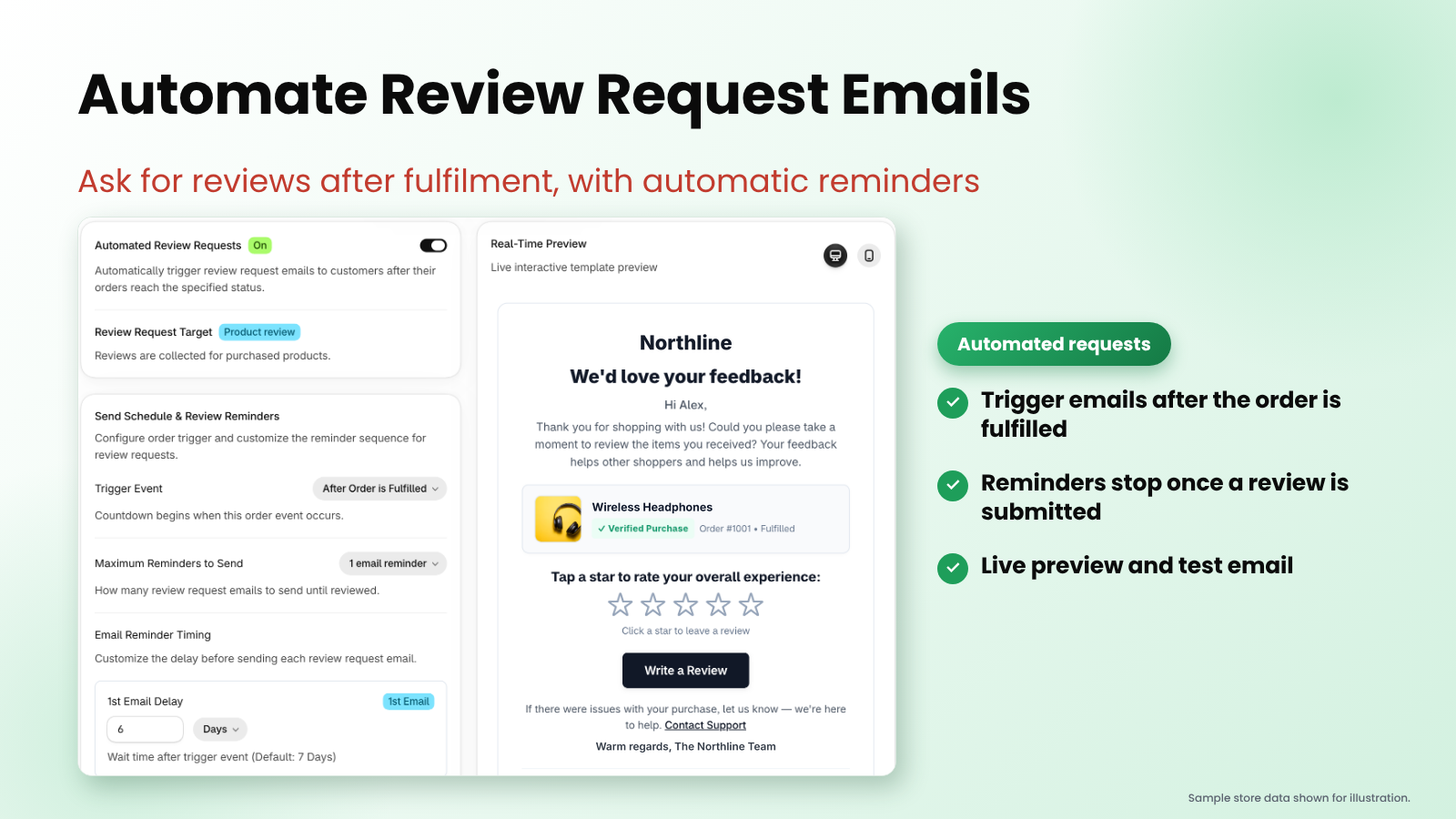
AC ‑ Reviews & Ratings sends a review request email as soon as an order is fulfilled. If the customer doesn't reply, it follows up with up to two reminders. The reminders stop the moment a review arrives, so nobody is chased after they've already written one.
You stay in control of the details:
- Trigger event: start the countdown when an order is fulfilled
- Number of reminders: send none, one or two follow-ups
- Timing: set how many days to wait before each email
- Live preview and test email: see the email as your customer will, then send yourself a test before you switch it on
The email preview at the top of this post shows what customers receive: your store name, the product they bought and a row of stars they can tap to start their review in one step.
2. Reviews From Email Are Marked Verified Purchases
Every review that comes in through a request email is tied to a real order. AC ‑ Reviews & Ratings marks it as a verified purchase, so shoppers can see it came from someone who bought the product.
That badge matters. Shoppers trust a verified buyer more than an anonymous name and it makes a fake review much harder to pass off as a real one. You can also limit reviews to logged-in customers for extra confidence.
3. See What Customers Praise and Complain About
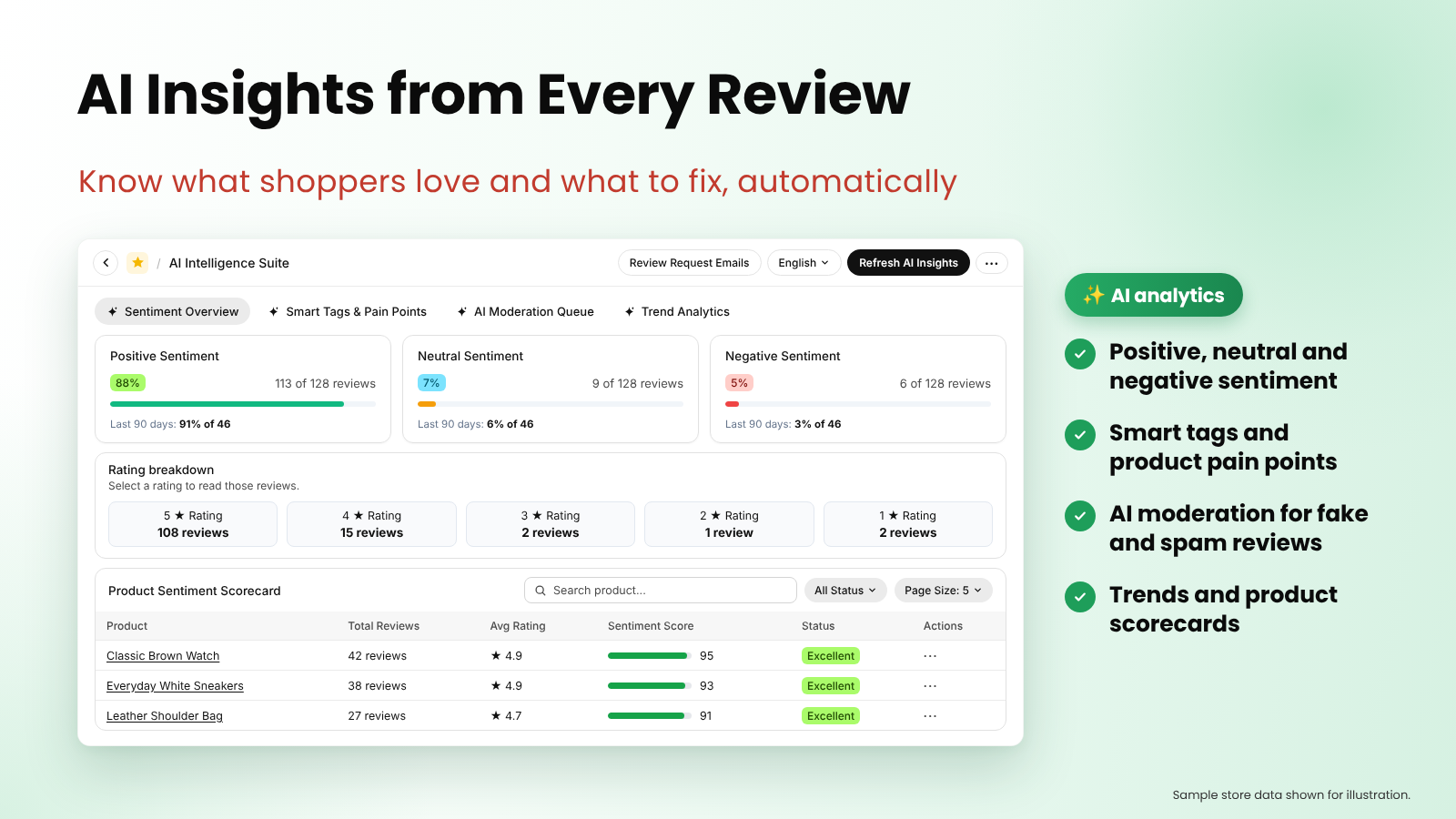
Reading hundreds of reviews one by one doesn't scale. AC ‑ Reviews & Ratings uses AI to read them for you and tells you what they mean: what customers praise, what they complain about and which products need attention.
Demo store, reviews and figures shown for illustration.
- Sentiment overview: see the share of positive, neutral and negative reviews
- Smart tags and pain points: spot the themes customers mention most, good and bad
- Product scorecards: find which products are winning and which need attention
- Trends: watch how sentiment changes over time
Use it as a to-do list. A product with a falling score or a repeated complaint about sizing tells you exactly where to look first.
4. Give Shoppers the Gist With AI Summaries, Replies and Translation
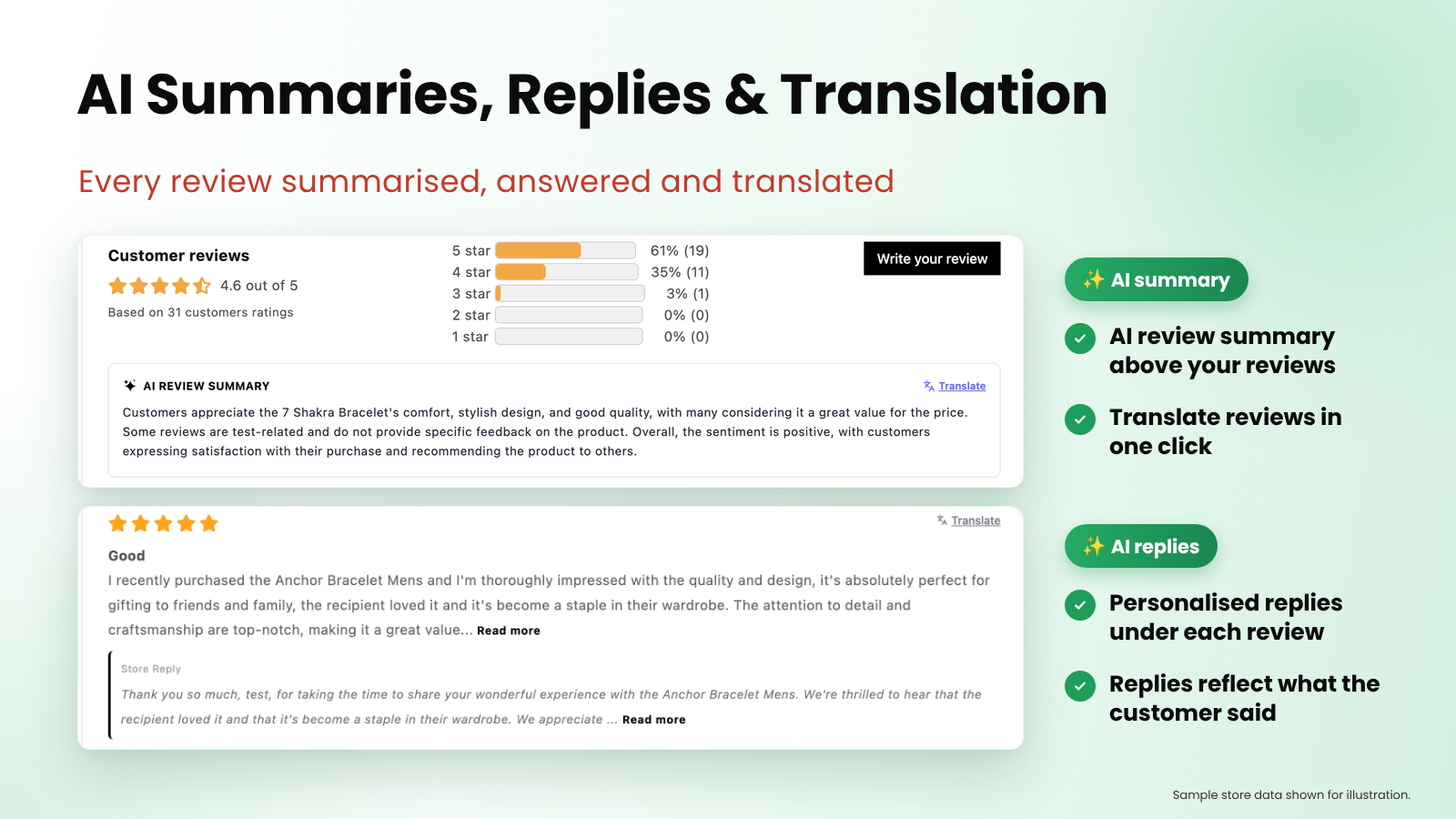
Your shoppers benefit from the same AI. An AI review summary sits above each product's reviews, so they get the overall picture in seconds instead of scrolling through every comment.
Demo store, reviews and figures shown for illustration.
- AI replies: a personalised reply under each review that reflects what the customer actually said
- One-click translation: shoppers can read reviews and summaries in their own language
- AI review writer: customers can turn a few quick notes into a full review
For a closer look at these features, see our post on AI replies, summaries and translation.
5. Keep Spam and Fake Reviews Off Your Store
One abusive or fake review can undo the trust that dozens of honest ones built. AC ‑ Reviews & Ratings checks each new review with AI before it goes live. Spam and defamatory reviews are held back in the AI moderation queue, so they never reach your storefront.
Genuine reviews keep flowing to your product pages as normal. If you want full control, turn on manual approval and every review waits for your OK before it publishes.
6. Show Photo Reviews and Star Ratings Anywhere
Photo reviews show the product in real customers' hands, which answers questions a studio shot can't. AC ‑ Reviews & Ratings lets you show photo reviews and star ratings wherever they help most, styled to match your theme so they look like part of your store.
Display options include star ratings, photo reviews, top reviews, review highlights, review summaries and helpful-vote buttons.
Plans at a Glance
We checked the Shopify App Store listing for the current plans. Billing is in USD, with recurring charges every 30 days.
| Plan | Price | Highlights |
|---|---|---|
| Free | $0 | 25 reviews a month, AI features to try, manual approval |
| Basic | $1.99/month or $19.99/year | Unlimited reviews, buyer verification, pre-publish approval, auto-publish |
| Advanced | $4.99/month or $49.99/year | Everything in Basic, higher AI limits, custom review form fields, custom email templates, like/dislike/report buttons |
Both paid plans include a 7-day free trial. For a detailed comparison by review volume, see which AC ‑ Reviews & Ratings plan fits your store.
A 15-Minute Setup Checklist
- Install the app and start on Free or a trial.
- Turn on automated review requests: trigger on fulfilment, choose your reminders and set the delay.
- Check the live preview and send yourself a test email.
- Choose where star ratings and photo reviews appear and match them to your theme.
- Turn on AI summaries, replies and translation.
- After a week, open AI insights and check the moderation queue.
Frequently Asked Questions
When is the review request email sent? After the order is fulfilled. You choose how many days to wait before each email.
How many reminders are sent? Up to two, and they stop as soon as the customer leaves a review.
Are reviews from emails verified? Yes. Reviews collected through request emails are marked as verified purchases.
How does the app deal with fake reviews? AI checks each new review before it goes live and holds spam and defamatory reviews back. You can also turn on manual approval.
Can shoppers read reviews in their own language? Yes. One-click translation shows reviews in each shopper's language, and the app supports 10 languages.
Is there a free plan? Yes. The Free plan includes 25 reviews and ratings per month plus limited AI usage so you can try the features.
Final Thoughts
More reviews start with asking. AC ‑ Reviews & Ratings asks every customer at the right moment, verifies the reviews that come back, turns them into insights you can act on and keeps fakes off your store.
Note: Plans and limits can change, so check the Shopify App Store listing for the latest details.
✨ Ready to collect more trusted reviews? Try AC ‑ Reviews & Ratings today.
💡 Need help? Our support team is here for you 24/7 - support@appifycommerce.com