How can I enable AI Product Review Summaries and how does this feature work?
The AI Product Review Summary feature automatically generates a summary of customer feedback for your products. It displays the AI-generated summary at the top of the review section on your storefront, helping shoppers quickly understand what customers think about a product.
How to enable AI Product Review Summaries:
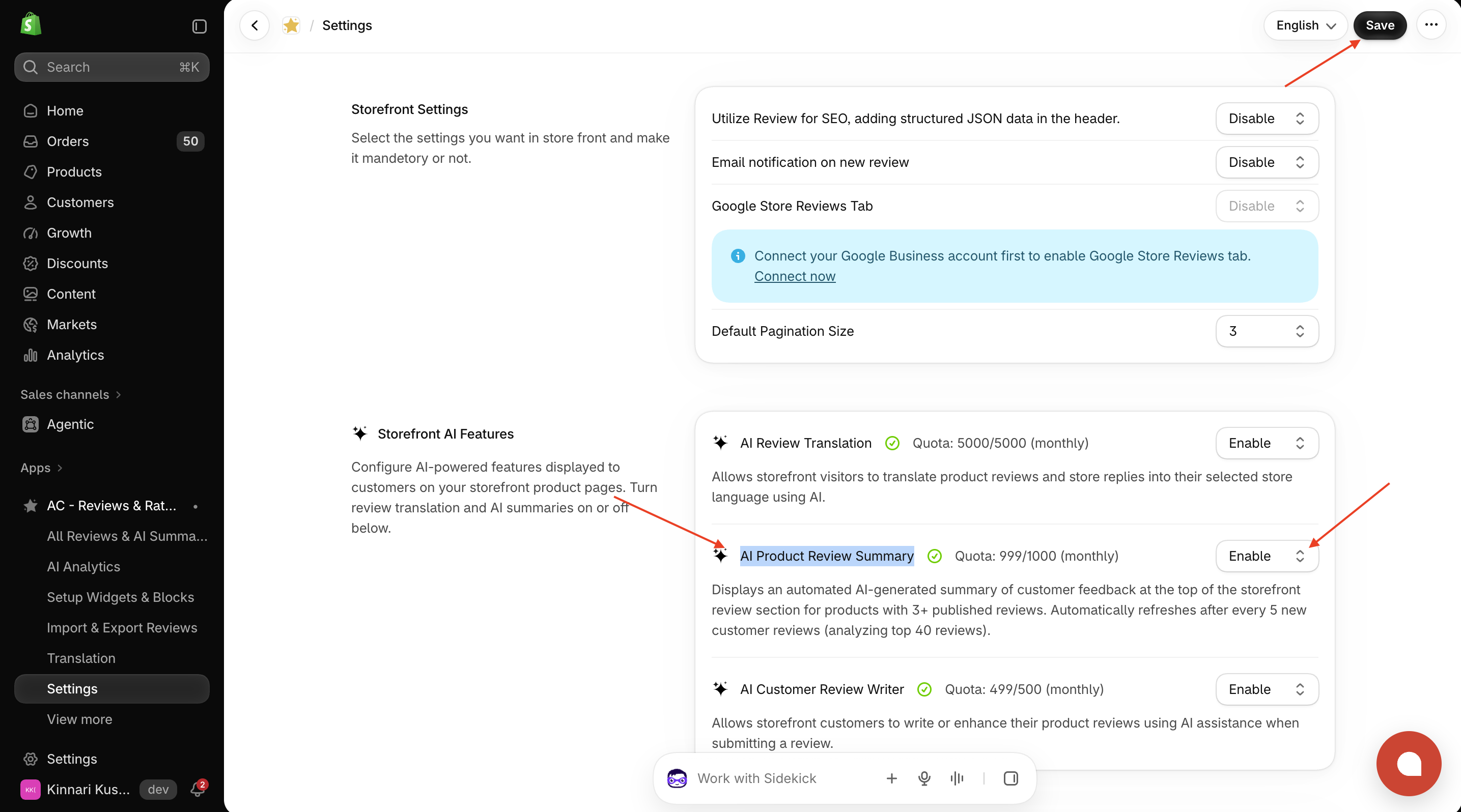
- Open AC – Reviews & Ratings in your Shopify admin.
- Go to Settings.
- Find the Storefront AI Features section.
- Locate AI Product Review Summary.
- Select Enable from the dropdown menu.
- Click Save to apply your changes.
- Visit a product page on your storefront to check the AI-generated review summary.
How does it work?
- The summary appears at the top of the product review section.
- It is available for products with at least 3 published reviews.
- The summary automatically refreshes after every 5 new customer reviews.
- AI analyzes up to the 40 most recent reviews when generating the summary.
Note: You can check your monthly AI Product Review Summary usage quota next to the feature in the Settings section.
Get Review & Rating App from here for your shopify store Review and Rating App