What is the Storefront Permission feature (AI answer for storefront) and how does it work?
The Storefront Permission feature allows merchants to grant the required permissions for AI-powered features to work properly on their Shopify storefront.
It helps merchants enable AI-generated answers and improve the customer experience by providing helpful responses to product questions.
How does it work?
Follow these steps to configure Advanced SEO Settings:
-
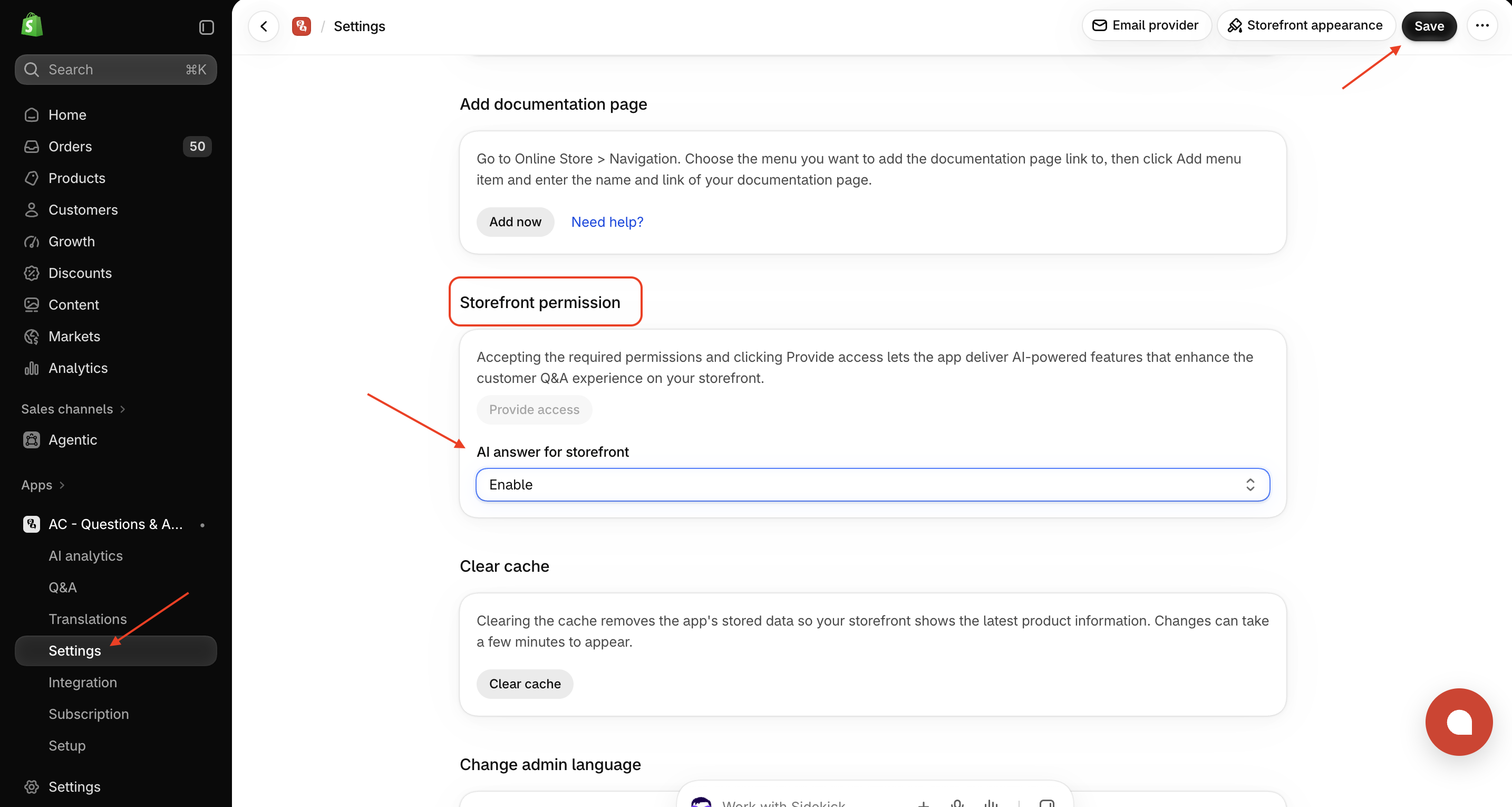
Go to Settings → See Storefront Permission section
-
Provide Access Grant the required permissions to allow AI-powered features to work on your storefront.
-
Enable AI Answer for Storefront Turn on the AI Answer for Storefront option to allow AI-generated answers to appear on product pages.
-
Save Settings Save your changes to apply the selected settings.
-
Check Your Storefront Visit your Shopify storefront and check whether AI-generated answers are working correctly.
Available Options:
-
Provide Access: Grants the required permissions to enable AI-powered storefront features.
-
AI Answer for Storefront: Allows merchants to enable or disable AI-generated answers for customers on product pages.
Get the app from here for your shopify store AC - Questions & Answers